Steps
- Create the Base question asking respondents
- Add a new section below this question
Hover over the section and open the Logic settings from the bottom-right corner.
The system displays two configuration options: Display Logic and Looping. Select Looping option
Choose Base question for looping.
You can Add New field , Apply Randomization & Apply Limit on loop
After apply all the require changes then Save & Exit
Example
Base Question:
Which products have you used?
If a respondent selects Option A and Option C, the survey will create two loops on entire section & each loop will contain the same question of section on which loop is applied.
Loop 1 → Option A
Loop 2 → Option C
Personalize Questions Using Pipe Text :- You can also use pipe text to dynamically insert the selected option into the follow-up section's questions. This ensures that each repeated question clearly refers to the specific item being evaluated.
Looping Based on Multiple Choice (MCQ)
When the Base Question Type is a Multiple Choice Question, looping can repeat a section based on the options related to that question.
Steps
- Create the MCQ as Base question asking respondents.
- Add a new section below this question
- Hover over the section and open the Logic settings from the bottom-right corner.
- The system displays two configuration options: Display Logic and Looping. Select Looping option
- Choose Base question for looping.
- You can Add New field , Apply Randomization & Apply Limit on loop
After apply all the require changes then Save & Exit
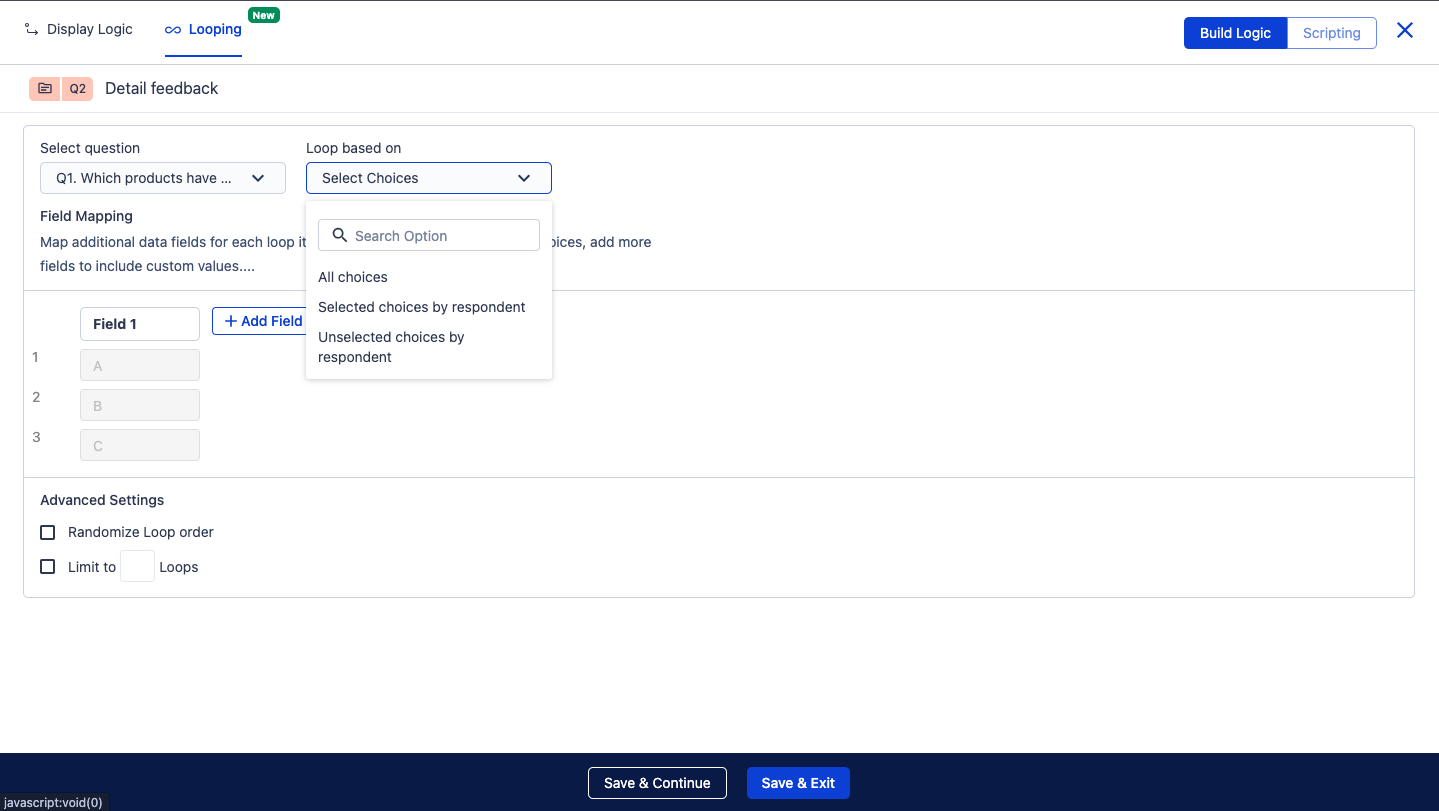 Base Question is Multiple Choice Question
Loop Based On Options
- Selected Choices by Respondent :- In this option, the loop runs only for the choices selected by the respondent in the base question.
- Unselected Choices by Respondent :- In this option, the loop runs for the options not selected by the respondent
- All Choices :- In this option, the loop runs for all options of the base question, regardless of the respondent's selection.
Field Mapping in MCQ
Field Mapping helps the system identify which option is being used in each loop.
When looping is based on a Multiple Choice base question, every selected/unselected/All option becomes one loop. Field Mapping stores that option so it can be used inside the questions in the looping section.

By default, the system creates
Field 1, which contains the selected/unselected/All option.
Adding Additional Fields :- The + Add Field option allows survey creators to add more fields for each loop iteration if additional data needs to be associated with the loop.
Each additional field can store:
Base Question:
Which cars do you own?
Options:
Field Mapping could be:
| Loop | Field 1 (Car Brand) | Field 2 (Car Category) |
|---|
| Loop 1 | A | SUV |
| Loop 2 | B | Sedan |


